Create and query maintenance notifications in S/4HANA through an API
SAP PM case MIX-003: create M2 notifications with equipment and query them from Postman using Cloud Integration, API Management and Cloud Connector. Includes laboratory tests and lessons.
A technician discovers a fault in the field. They need to report what happened, which equipment is affected and the priority, without waiting for someone else to enter that information into SAP.
SIS-CASE-MIX-003 connects this Plant Maintenance (PM) process to SAP Integration Suite: an external application creates a maintenance notification in S/4HANA, then queries the assigned number. It follows the maintenance order lookup case.
A notification records a maintenance need; it does not automatically create an order. Planning and executing the intervention belong to later PM process steps.
Download the MIX-003 Postman collection and environment
Case manual, 11-page PDF: Spanish · English. Includes architecture, screenshots, tests and lessons from the initial implementation. Also available in Resources.
What is tested and what remains pending
September 24, 2026 update: part 2: validation and error contract is now available, with Block 1 closed, flat JSON GET responses and error tests. This article and its downloads retain the initial part 1 implementation described below.
Laboratory evidence from September 22, 2026, captured with Bruno, shows creation directly through CPI and via APIM, followed by queries. This publication's Postman collection adapts those operations for your environment.
| Operation | Initial test behavior |
|---|---|
| POST to CPI or APIM | HTTP 201 with JSON and the number assigned by SAP |
GET with notificationNumber | HTTP 200 with XML returned by the OData adapter |
| Validation and business errors | No complete, uniform contract yet |
| Case closure | Pending: finish the GET response and functional confirmation in SAP |
The case also includes a design review with XSD, XSLT, controlled errors and additional policies. Those revised resources are not equivalent to a fully validated tenant implementation. Here we distinguish the initial test from that evolution.
In this guide
- Business scenario
- Connectivity and contract
- One iFlow for POST and GET
- API Management exposure
- Postman tests
- Errors and lessons
- Evolving the proof of concept
Business scenario
In this fictional company, contractors report faults from an external application. The maintenance team requires two operations:
- Create an
M2breakdown notification with description, priority, equipment and reporter. - Query it by number to confirm registration.
Equipment is essential: receiving a 201 for a notification without a technical object does not satisfy the business requirement. Verify the equipment association and values derived by S/4HANA, such as plant and functional location.
API Management receives the public API consumer. Cloud Integration transforms the message and accesses the on-premise system through Cloud Connector:
Postman / technician application
  → API Management: consumer API Key
  → Cloud Integration: POST / GET Router
  → Cloud Connector
  → SAP S/4HANA: API_MAINTNOTIFICATION
The API Key identifies the application. reportedBy is a declared payload value, not an authenticated technician identity.
Connectivity and contract
Prepare backend access
In Cloud Connector, allow resource /sap/opu/odata/sap/API_MAINTNOTIFICATION with Path And All Sub-Paths on the authorized S/4HANA mapping. Keep the previous Maintenance Order resource as well.
Confirm virtual host, port, Location ID and a backend credential with creation and query permissions. The receiver uses the virtual host rather than the SAP server's internal host.
Verify the target system's EDMX before building. The laboratory used:
| Item | Observed value |
|---|---|
| Service | API_MAINTNOTIFICATION |
| EntitySet | MaintenanceNotification |
| EntityType | MaintenanceNotificationType |
| Equipment during creation | TechnicalObject |
| Object discriminator | TechObjIsEquipOrFuncnlLoc = EAMS_EQUI |
In this backend, FunctionalLocation is not sent as a writable Create field: SAP derives it from the equipment. Check these decisions against your S/4HANA version's metadata, configuration and authorizations.
Create input
POST {{apimUrl}}
apikey: {{apikey}}
Content-Type: application/json
{
  "notificationType": "M2",
  "description": "Ruido anormal en rodamiento",
  "priority": "2",
  "equipment": "10000",
  "reportedBy": "CONTRATISTA1"
}
These are the exercise's original sample values. Replace the equipment and other data with allowed laboratory values. The example description, meaning abnormal bearing noise, has 26 characters; the revised contract limits it to 40.
Query input
GET {{apimUrl}}
apikey: {{apikey}}
notificationNumber: {{apimLastNotification}}
Send no body. Keep the number as text and use the successful POST result from that same layer. Do not reuse an identifier from an earlier failed execution.
One iFlow for POST and GET
The laboratory artifact is Manage_MaintNotification_Postman_to_S4HANA in package ACME_MAINTENANCE_NOTIFICATION.
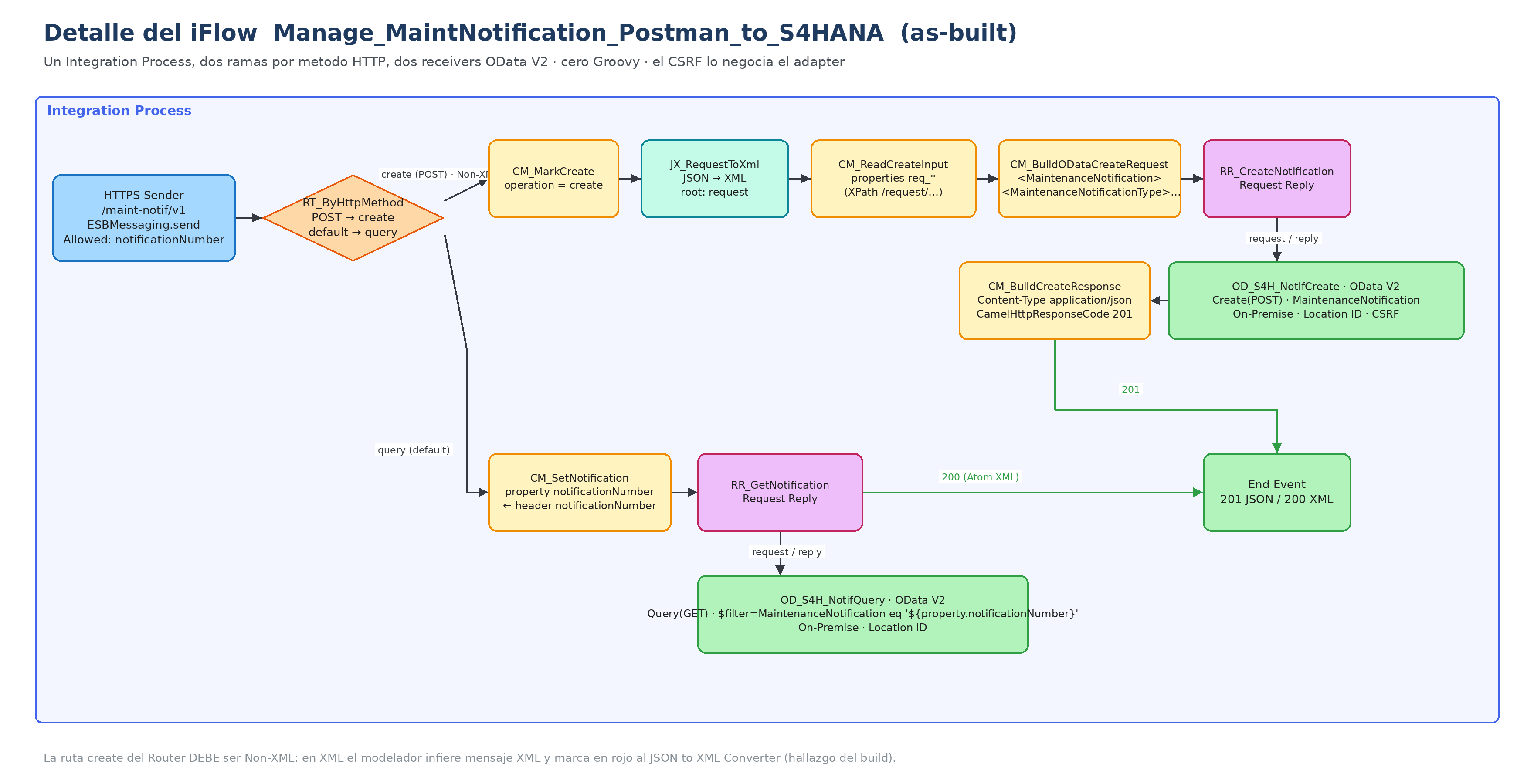 Initial implementation: creation returns JSON; query returns XML. The default query route is a limitation of this version. The review proposes explicit GET and 405 for other methods.
Sender and method selection
Configure the HTTPS Sender with Address /maint-notif/v1 and ESBMessaging.send role authorization. Add notificationNumber to Allowed Header(s).
Router RT_ByHttpMethod uses Expression Type = Non-XML for its create route:
${header.CamelHttpMethod} = 'POST'
The initial build used query as its default route. To extend it, configure an explicit GET route and reserve default for 405, preventing PUT from accidentally executing a query.
Create branch
The initial proof of concept uses standard steps without Groovy:
CM_MarkCreate → JX_RequestToXml → CM_ReadCreateInput
  → CM_BuildODataCreateRequest → RR_CreateNotification
  → CM_BuildCreateResponse
The JSON to XML Converter adds root request. A Content Modifier extracts the five input fields with XPath. The backend mapping is:
| Input | OData field |
|---|---|
notificationType | NotificationType |
description | NotificationText |
priority | MaintPriority |
equipment | TechnicalObject |
reportedBy | ReportedByUser |
Constant EAMS_EQUI | TechObjIsEquipOrFuncnlLoc |
Example receiver input XML for the exercise's controlled data:
<MaintenanceNotification>
  <MaintenanceNotificationType>
    <NotificationType>M2</NotificationType>
    <NotificationText>Ruido anormal en rodamiento</NotificationText>
    <MaintPriority>2</MaintPriority>
    <TechnicalObject>10000</TechnicalObject>
    <TechObjIsEquipOrFuncnlLoc>EAMS_EQUI</TechObjIsEquipOrFuncnlLoc>
    <ReportedByUser>CONTRATISTA1</ReportedByUser>
  </MaintenanceNotificationType>
</MaintenanceNotification>
The initial implementation builds XML and JSON using Content Modifiers. For arbitrary text, the review proposes XSLT and converters with serialization: directly interpolating quotes or ampersands can break the message.
Create receiver and CSRF
| Configuration | Value |
|---|---|
| Adapter | OData V2 |
| Proxy Type | On-Premise |
| Address | http://<VIRTUAL_HOST>:<PORT>/sap/opu/odata/sap/API_MAINTNOTIFICATION |
| Credential Name | Backend Security Material alias |
| Location ID | Cloud Connector's configured value |
| Operation | Create(POST) |
| Resource Path | MaintenanceNotification |
| CSRF Protected | Enabled |
Use the backend model to select the six Create fields. The adapter manages CSRF token and session handling; the consumer does not obtain S/4HANA's token. Do not assume a fixed number of internal calls: it can vary with version and configuration. See SAP's OData V2 receiver documentation.
POST creates a real document. This proof of concept has no idempotency mechanism: do not automatically retry creation when its outcome is uncertain. Reconcile the result in SAP and the MPL first.
Query branch
CM_SetNotification copies header notificationNumber into an Exchange Property. RR_GetNotification calls the OData V2 receiver with Query(GET), Resource Path MaintenanceNotification and:
$filter=MaintenanceNotification eq '${property.notificationNumber}'
The review proposes validating the number before building the filter and using $top=2 to detect unexpected cardinality.
In the initial evidence, GET returns XML with root MaintenanceNotification and records MaintenanceNotificationType. It does not yet return flat JSON like POST. Empty results still need a controlled 404; HTTP 200 alone does not prove that the requested notification exists.
API Management exposure
Proxy api-maint-notif-v1 uses base path /acme/notifications/v1 and targets CPI endpoint /http/maint-notif/v1. The initial configuration forwards POST and GET to the same iFlow.
| Location | Policy | Purpose |
|---|---|---|
| ProxyEndpoint · PreFlow | PL_VerifyApiKey | Validate the consumer's apikey header |
| TargetEndpoint · PreFlow | PL_KvmCpiAuth | Read CPI credentials from an encrypted KVM |
| TargetEndpoint · PreFlow, after KVM | PL_BasicAuthToCpi | Build Authorization for CPI |
Publish PRD_Acme_Notifications and associate an application in Developer Hub. Its Application Key is the consumer's API Key.
Postman access through APIM uses No Auth plus apikey. CPI Basic credentials stay in the proxy and should not be given to the external consumer.
This minimal exposure still needs traffic limits, API Key removal before the target and Fault Rules. See the governed CPI and API Management case for that next step.
Postman tests
The downloadable package contains CPI and APIM collection folders, a secret-free environment and an execution guide. Its assertions match the initial POST JSON and GET XML contracts.
| Variable | Configuration |
|---|---|
cpiUrl | Complete HTTPS endpoint URL, including /http/maint-notif/v1 |
apimUrl | Complete HTTPS proxy URL, including /acme/notifications/v1 and any tenant prefix |
clientId, clientSecret | CPI runtime credentials, only for authorized direct testing |
apikey | Application Key of the app subscribed to the product |
equipment, reportedBy | Valid laboratory values |
cpiLastNotification, apimLastNotification | Saved after validating each layer's POST |
Manually run the POST for the desired layer. The script first clears the previous ID, then checks HTTP 201, JSON, notification number, description and equipment. Equipment comparison accounts for SAP's internal leading zeros without modifying the received value.
Next, run GET from that same folder. The collection checks HTTP 200 and exactly one XML record with the expected number. This does not validate every business field: compare priority, reporter, equipment and derived values with SAP.
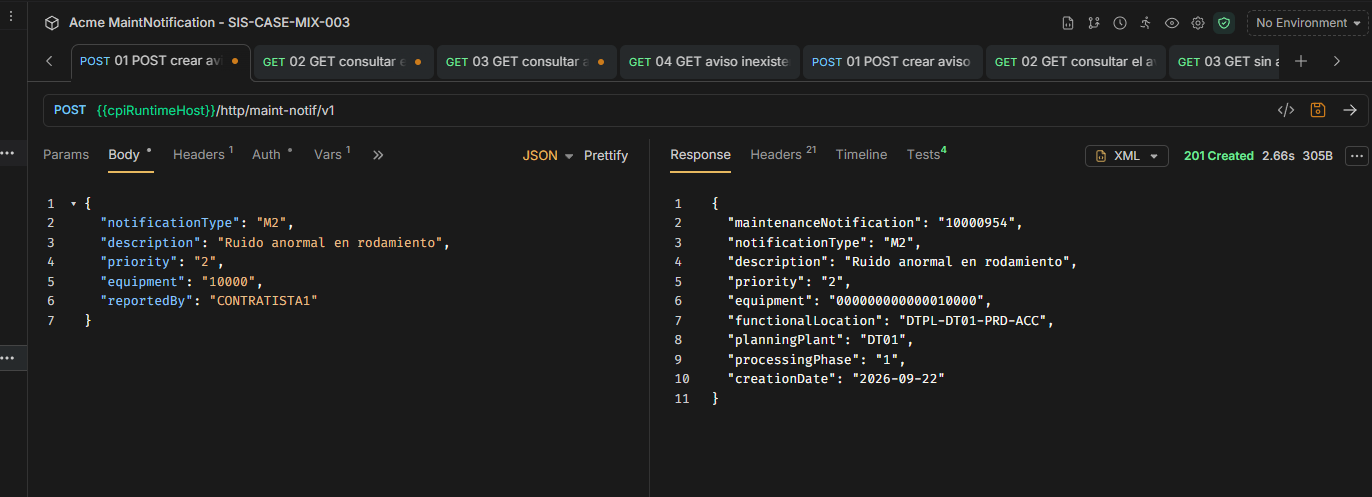 September 22 evidence: notification 10000954 created for equipment 10000. The backend returns leading zeros and derives functional location and plant. The screenshot uses host variables.
The case log also records notification 10000956, created via APIM for equipment 10002. These are historical laboratory results, not identifiers to reuse as your own test outcomes.
The download also includes a request without an API Key to check proxy rejection. It is supplied ready to execute; this publication does not claim every negative scenario in the review was tested.
Errors and lessons
| Build or test symptom | Documented finding and correction |
|---|---|
| JSON to XML Converter red; Save fails | The create route used XML conditions. Change to Non-XML and evaluate CamelHttpMethod. |
POST fails with Technical object is invalid | A typo in req_equipment left the technical object empty. Check property names in Trace. |
| Query Modeler tries to read a missing local EDMX | Check Connection Source and use Remote or current metadata from the target backend. |
| POST succeeds with CSRF Protected unchecked | In the tested version, the adapter retrieved a token after a 403. Keep CSRF Protected enabled and do not assume identical behavior elsewhere. |
| HTTP 201 but business data is missing | Technical success can fail the PM requirement. Review the complete document, not only the HTTP status. |
Investigate the message MPL and Error Details. Enable Trace temporarily when properties or payload need inspection; remove credentials, tokens and private hosts from shared evidence.
Evolving the proof of concept
The design review prepares these next steps:
- Validate input and reject oversized descriptions or empty mandatory fields.
- Replace XML/JSON interpolation with XSLT and converters that serialize values.
- Accept only POST and GET, returning 405 for other methods.
- Require
notificationNumber, handle empty results and return consistent JSON. - Add an Exception Subprocess, correlation ID and error contract.
- Externalize connections and complete Quota, Spike Arrest, header cleanup and Fault Rules in APIM.
Verify each change against the receiver's actual XML and tenant runtime. The case remains open until those checks and functional SAP review are complete; this is not presented as production-ready.
The main lesson connects business and technology: the integration adds value when the SAP notification contains the technical object and information needed to continue the maintenance process.