An AI agent that reads and creates SAP PM maintenance notifications with MCP
MIX-005: expose a S/4HANA notifications API as an MCP Server in SAP Integration Suite. Two tools, Claude Desktop tests, screenshots and a downloadable manual.
A maintenance planner wants to query a notification in a conversation and register another without assembling an HTTP request manually. SIS-CASE-MIX-005 connects that agent to SAP Plant Maintenance (PM) through two MCP tools: read a notification by number and create a notification from explicit inputs.
The case reuses the API from MIX-003 and its Part 2 validations. It adds an MCP Server in SAP Integration Suite, a Destination and the agent subscription. No new iFlow is required.
Documented scope as of October 2, 2026: reading and creation verified in the laboratory against S/4HANA, including MCP tests, major negative cases, API regression and a real agent in Claude Desktop. The agent-created notification was checked in IW23. Evidence of traffic-limit 429 responses, credential rotation and operational closure remain pending. Publishing this case does not repeat these SAP operations or certify a production solution.
Public English manual — 23-page PDF · Postman, contracts and policies — ZIP · All resources
Architecture: from conversation to SAP notification
The agent discovers tools and sends JSON-RPC calls to the MCP Server. A Destination directs the calls to API Management; the proxy reuses Cloud Integration and S/4HANA access through Cloud Connector. The business object remains the maintenance notification: MCP provides the tool contract that the agent understands.
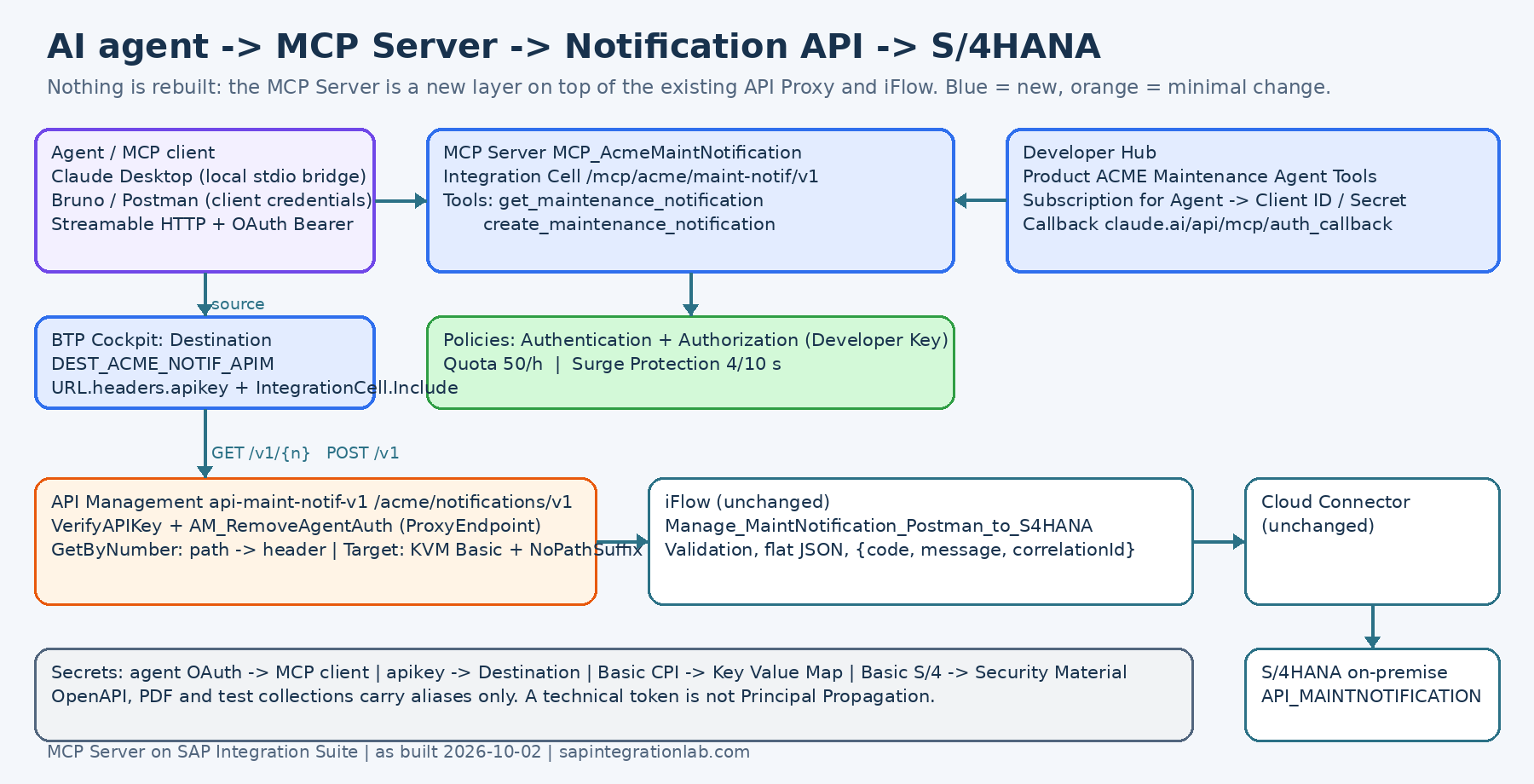 Explanatory diagram from the public manual. Screenshots in the following sections provide the laboratory evidence.
| Component | Role in this case |
|---|---|
| Claude Desktop | Conversation, tool selection and user confirmation |
| MCP Server on Integration Cell | Discovery, contract and execution of two tools |
| HTTP Destination | Proxy access and API key injection |
| API Management | Consumer validation, path adaptation and CPI credentials |
| Existing iFlow | Create and read notifications through API_MAINTNOTIFICATION |
| Cloud Connector and S/4HANA | Backend connectivity and notification persistence |
The runtime used is Integration Cell. For this route, SAP documents an HTTP endpoint, an OpenAPI specification and connectivity configuration as the basis of the server. Availability depends on the environment and service plan; check it before the build. SAP reference: create an MCP Server from an HTTP endpoint.
Prepare the existing API
The OpenAPI exposes GET /v1/{notificationNumber} and POST /v1, under the relative path /acme/notifications. In the laboratory, the iFlow expected the number in the notificationNumber header. The proxy needed adaptation to align the public path with the existing contract.
- Create conditional flow
GetByNumberfor(proxy.pathsuffix MatchesPath "/*") and (request.verb = "GET"). - Extract
/{notificationNumber}withEV_NotifNumberFromPathand assign the header withAM_NotifNumberToHeaderin the flow Request. - In TargetEndpoint PreFlow, after preparing CPI authentication, apply
AM_NoPathSuffix:target.copy.pathsuffix=false. This prevents appending the number to the fixed iFlow endpoint and causing a 404. - Activate Edit in the policies editor and check that the steps were actually attached. Seeing an available policy does not prove that the flow executes it.
The case regression recorded POST 201 and GET 200 through APIM. This check is separate from the MCP cycle: first make sure the API that the server will invoke works.
Separate identities at every hop
The agent token authenticates entry to the MCP Server. The Destination uses the APIM consumer's API key. The proxy prepares Basic authentication to CPI from an encrypted KVM, and the iFlow uses its Security Material for S/4HANA. These credentials have different recipients.
In the first test, the agent's Bearer reached CPI and caused 403: that token lacked the receiver's required messaging permission. The fix was AM_RemoveAgentAuth in ProxyEndpoint PreFlow, after Verify API Key and before TargetEndpoint built CPI Basic authentication. Placing it after that Basic authentication would also remove the correct credential.
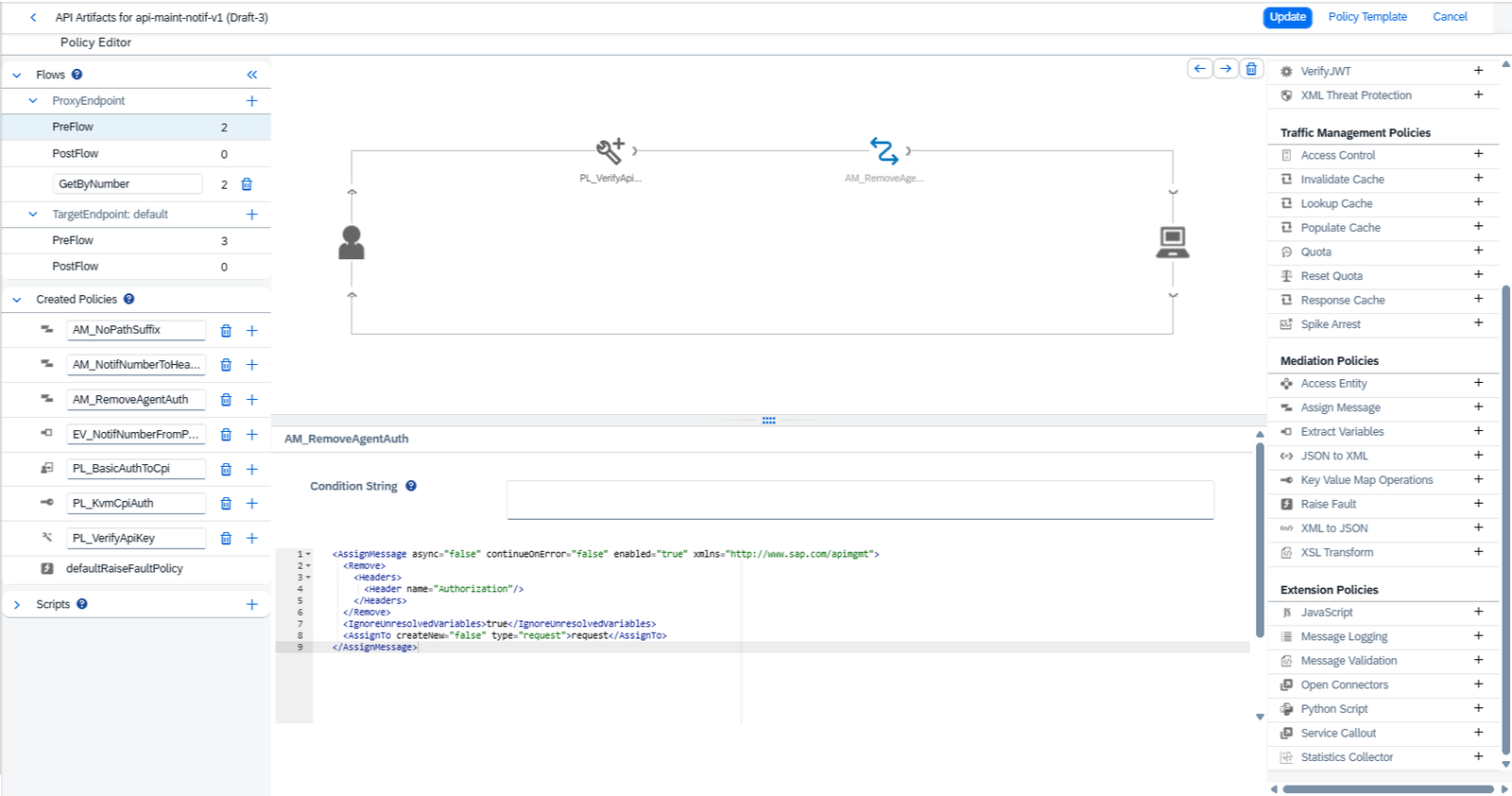 Manual screenshot: remove the agent Authorization before preparing the next hop's identity.
Destination DEST_ACME_NOTIF_APIM uses HTTP, Internet and NoAuthentication, with URL.headers.apikey and IntegrationCell.Include=true. Here, NoAuthentication describes the Destination configuration; the added header still identifies the consumer to APIM. It does not expose an uncontrolled backend.
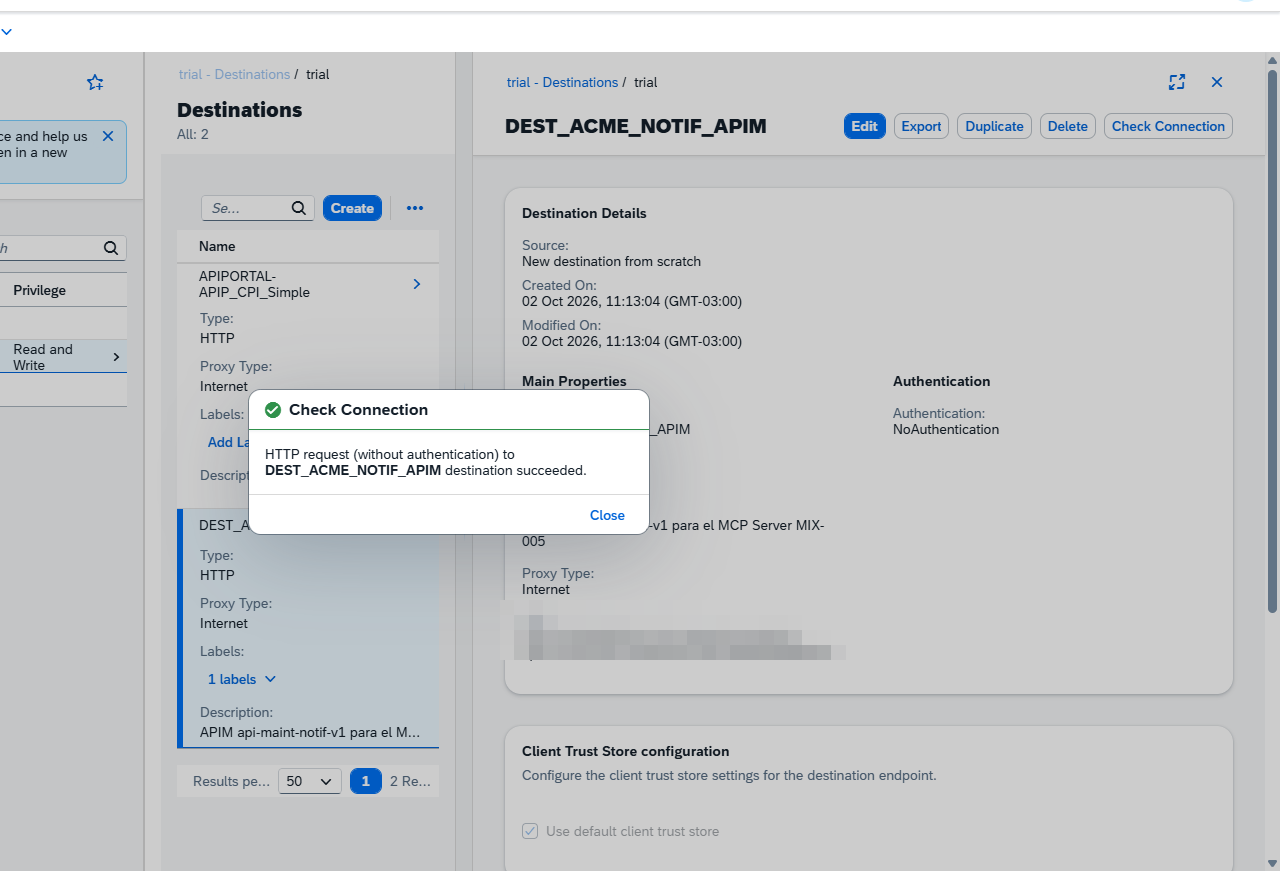 Successful Check Connection in the laboratory. This is a connectivity prerequisite, not a test of every operation.
Create and publish the two tools
The MCP Server wizard used HTTP Endpoint with OpenAPI Specification, the previous Destination and the contract specification. Artifact MCP_AcmeMaintNotification was deployed as version 1.0.3, with status Started and path /mcp/acme/maint-notif/v1.
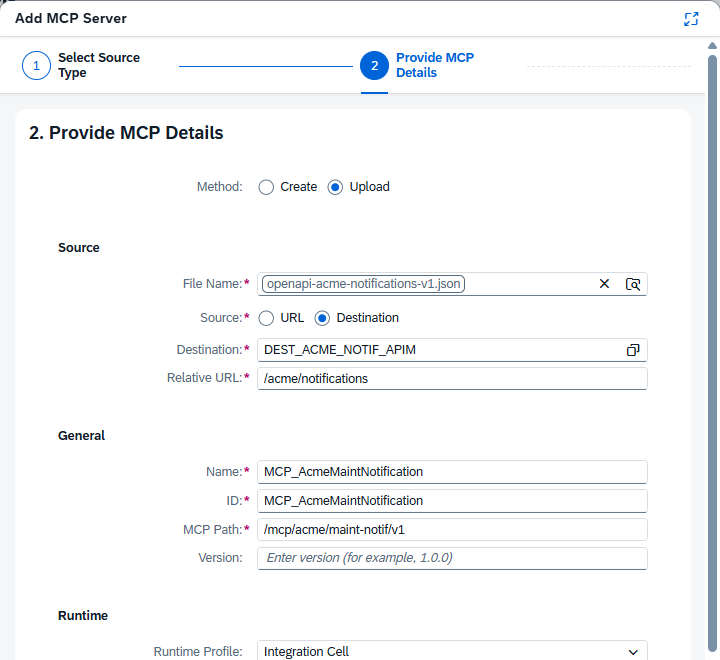 Configuring the tools' source in SAP Integration Suite.
In this build, the gateway generated names get_v1_notificationNumber and post_v1. They were renamed and given business-oriented descriptions:
| Tool | Input | Expected result |
|---|---|---|
get_maintenance_notification | notificationNumber: 1–12 digits | Flat JSON with 16 fields, including the order when associated |
create_maintenance_notification | requestBody object containing creation fields | New notification number and backend-returned data |
The catalog contains only two tools, with no update or deletion.
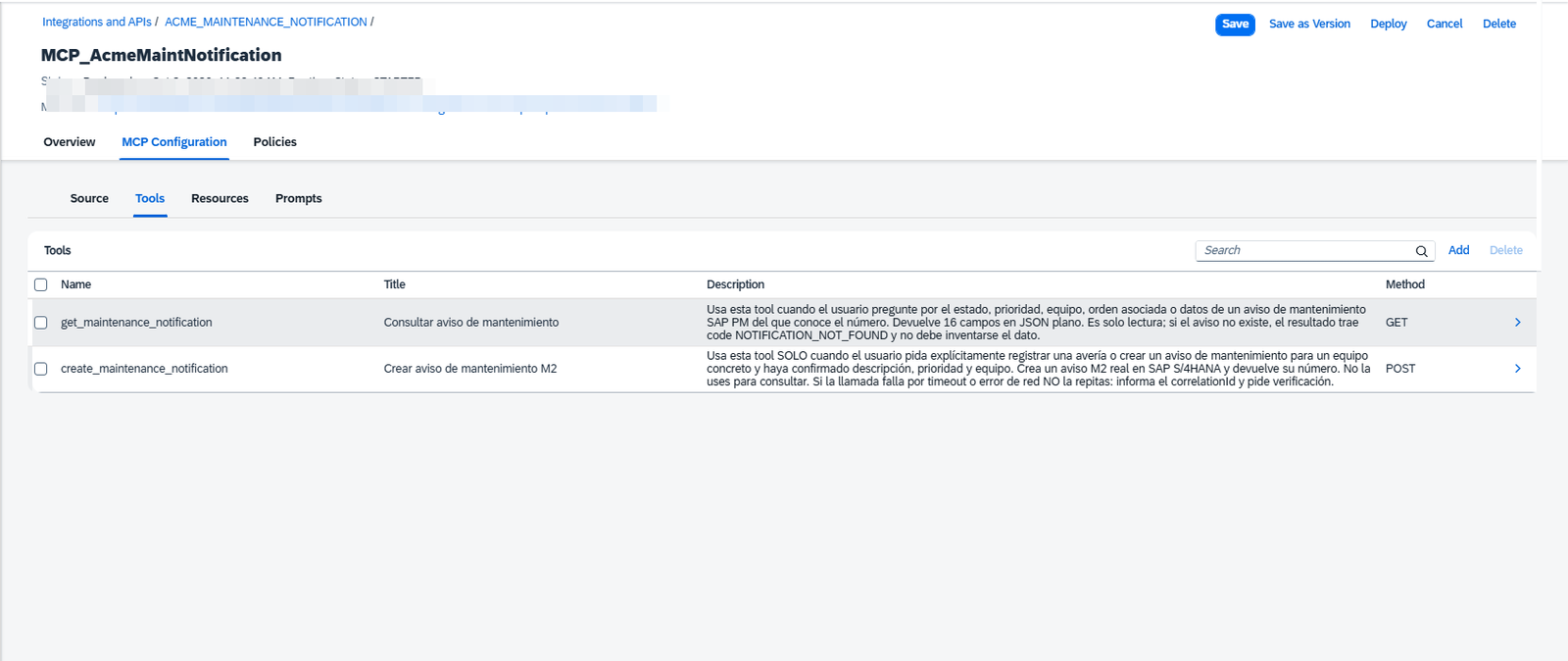 Final names visible to the MCP consumer. The generation behavior described belongs to this laboratory.
Authentication with OAuth and Client Certificate, Authorization with Developer Key, a Quota of 50 calls per hour and Surge of 4 calls per 10 seconds were configured. The Calendar quota identifies the client with ${context.authn.getClientID()}. The limits are configured; the test that must demonstrate 429 rejection remains pending.
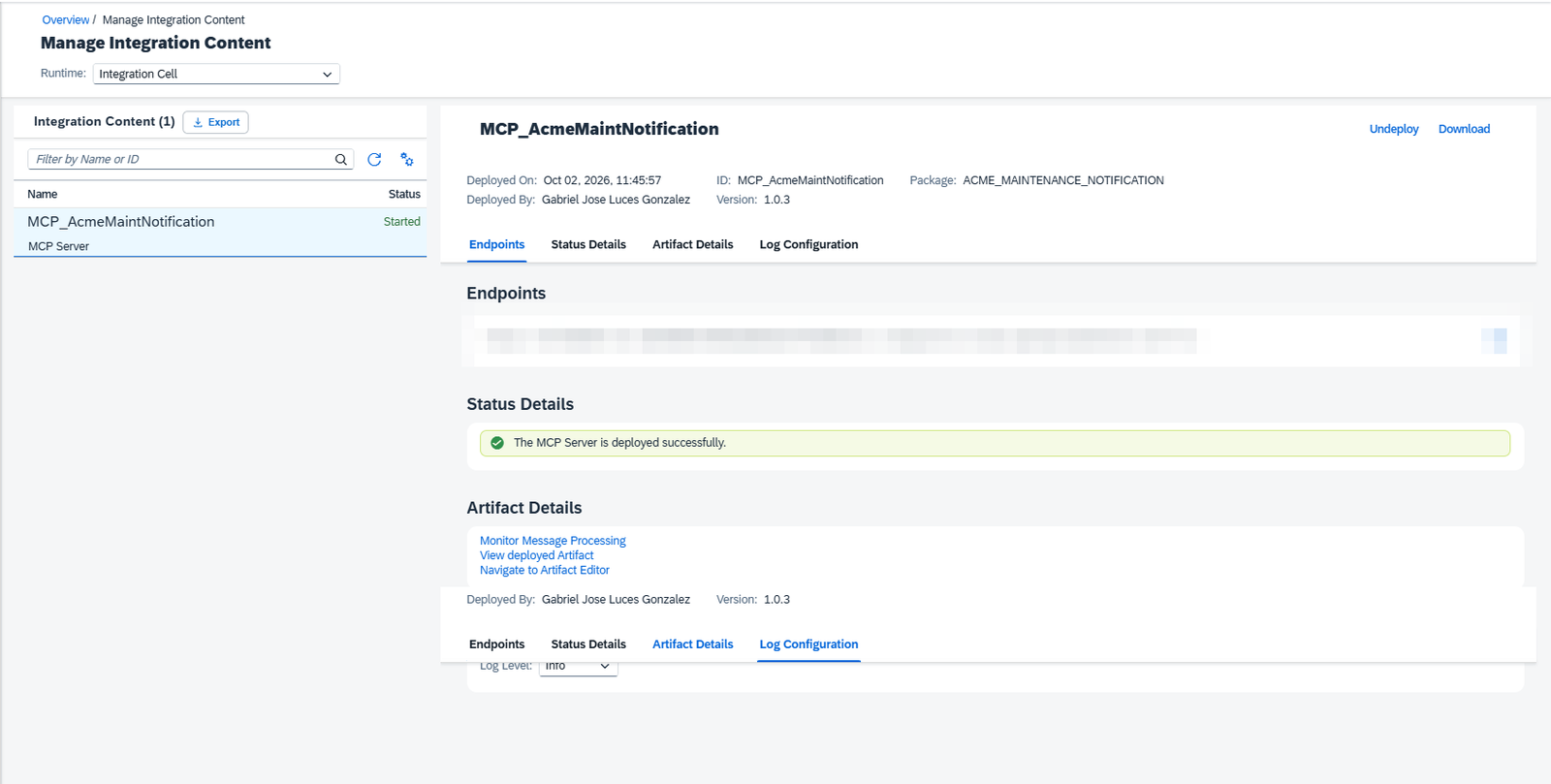 Artifact status on Integration Cell; functional tests are documented separately.
Product ACME Maintenance Agent Tools was published in Developer Hub through AI Artifacts, and an agent subscription was created. Key, Secret and Token URL remained in the credential manager and local files excluded from publication. Downloads on this page contain placeholders.
Run the MCP cycle and read a notification
The tested protocol revision was 2025-06-18, over Streamable HTTP. The cycle was initialize, notifications/initialized, tools/list and tools/call. The client keeps Mcp-Session-Id when returned by the server and uses the negotiated version in MCP-Protocol-Version. MCP reference: lifecycle.
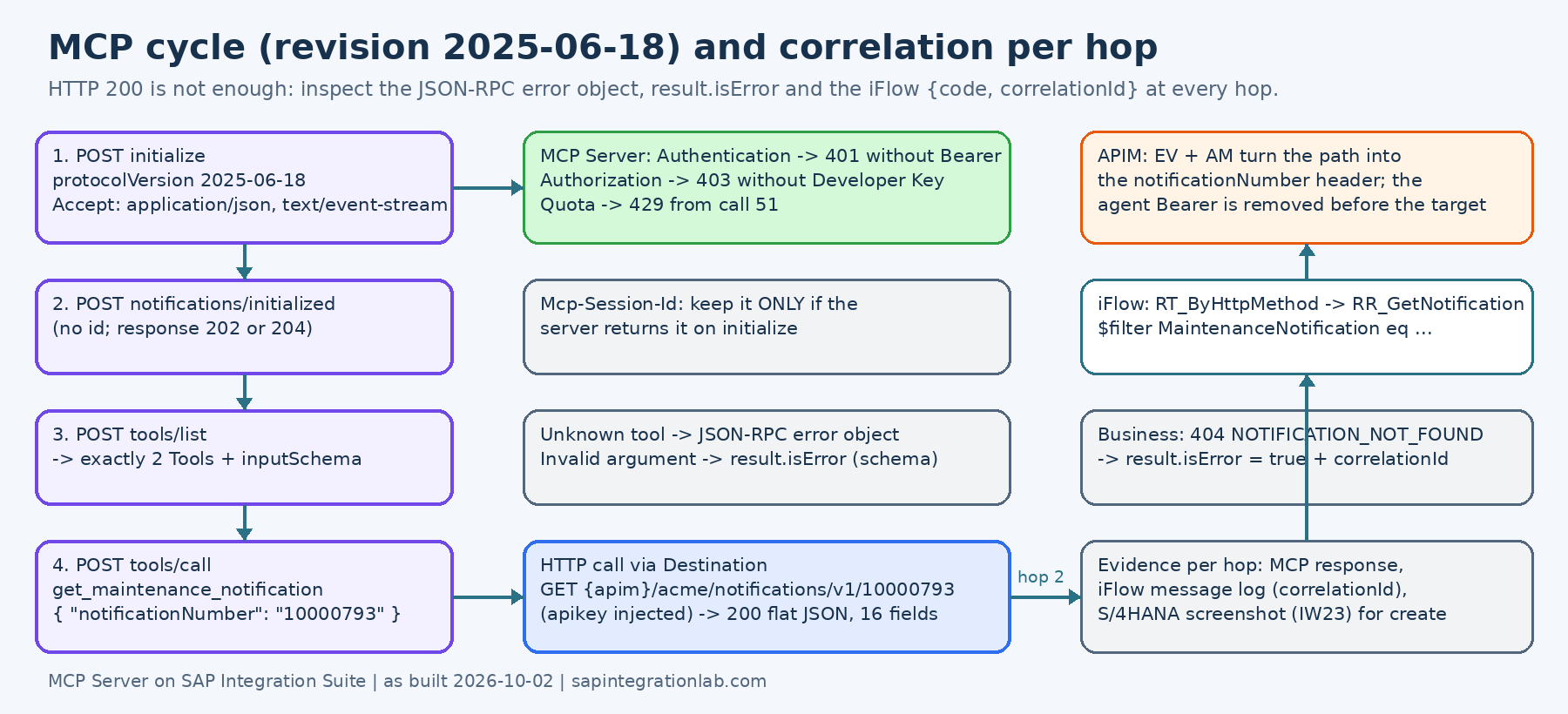 Explanatory diagram: initialize the session before listing and invoking tools.
Requests to the MCP endpoint use POST, even when the business operation ultimately uses GET. Headers include Content-Type: application/json, Accept: application/json, text/event-stream and the agent's Bearer authorization. Example lookup after session initialization:
{
  "jsonrpc": "2.0",
  "id": 4,
  "method": "tools/call",
  "params": {
    "name": "get_maintenance_notification",
    "arguments": { "notificationNumber": "10000793" }
  }
}
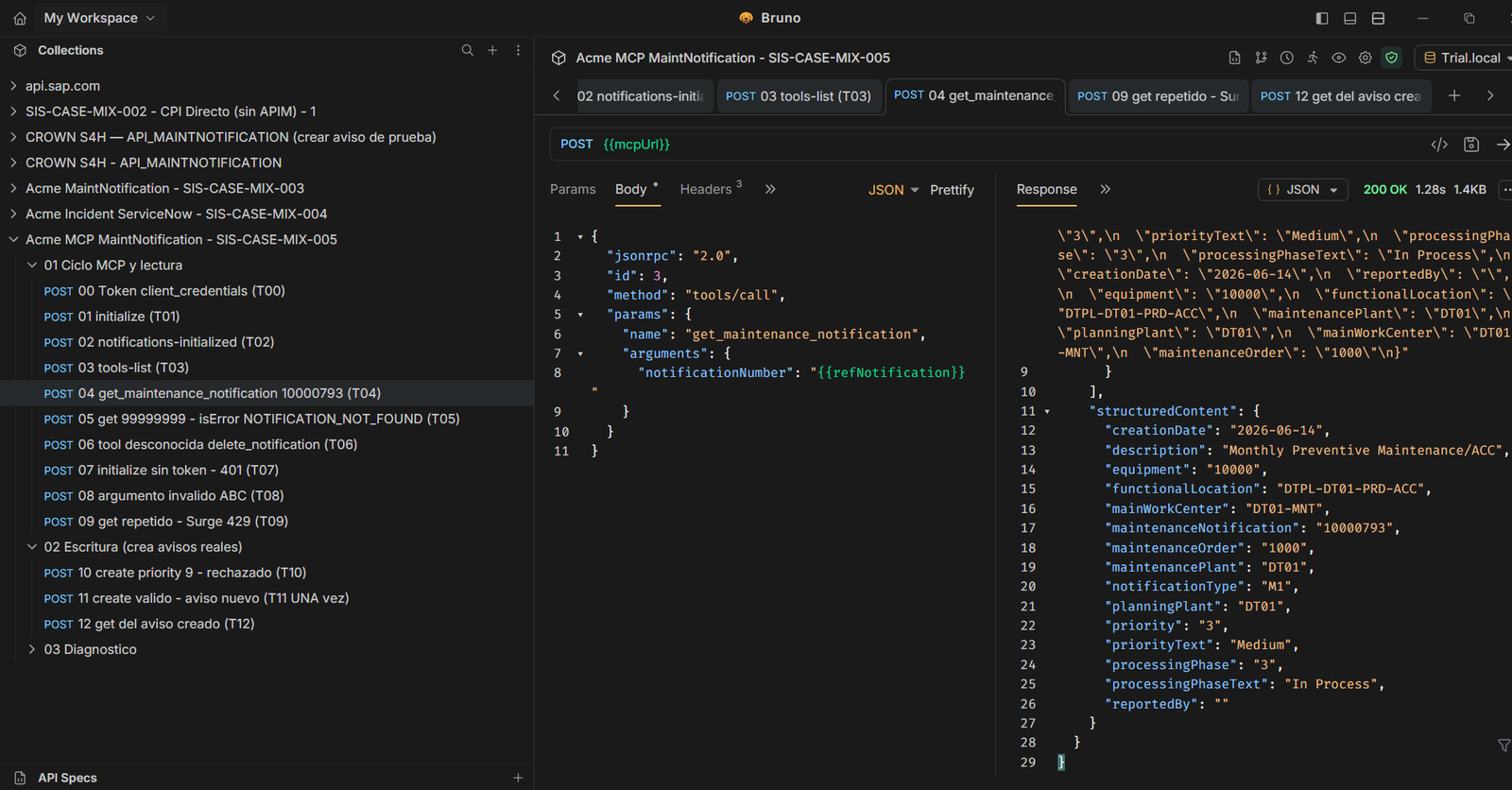 T04: documented lookup of notification 10000793, associated with order 1000. These numbers are historical evidence, not guaranteed data for another system.
The result includes structuredContent and a textual representation in content. A client must interpret the MCP result, rather than assume business success from HTTP 200. The specification distinguishes protocol errors from execution failures marked with isError. MCP reference: tools and results.
Create a notification: requestBody is required
Error ER-12 showed that the POST tool expects its fields inside arguments.requestBody. Sending them directly within arguments does not match the published schema. Constraints include a 1–40 character description, priority 1, 2, 3 or 4, equipment with 1–18 digits and reportedBy with 1–12 alphanumeric or underscore characters.
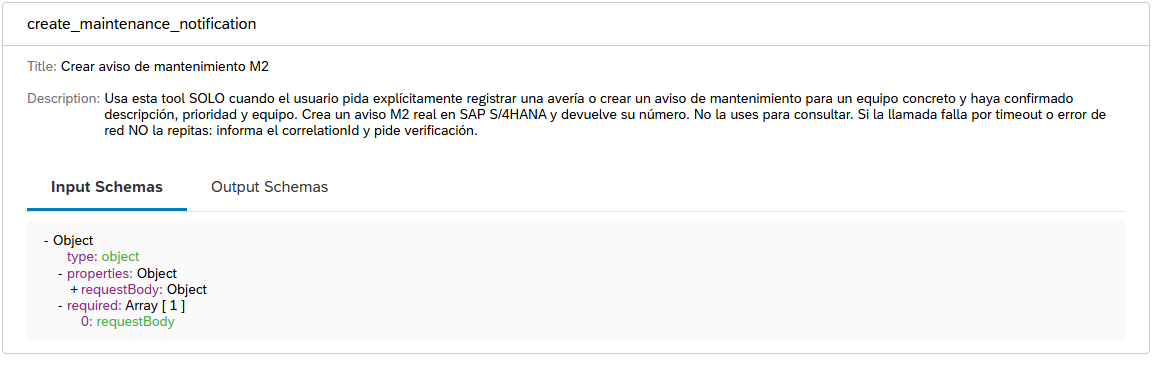 Schema published in Developer Hub: business fields belong inside requestBody.
{
  "jsonrpc": "2.0",
  "id": 11,
  "method": "tools/call",
  "params": {
    "name": "create_maintenance_notification",
    "arguments": {
      "requestBody": {
        "notificationType": "M2",
        "description": "MCP LAB TEST",
        "priority": "3",
        "equipment": "10000",
        "reportedBy": "MCP_LAB"
      }
    }
  }
}
This call writes to SAP. Values illustrate the laboratory: choose an authorized equipment record and confirm all inputs before executing. Matching a numeric equipment pattern does not implement an allowlist or prove existence; S/4HANA validates business data. reportedBy does not prove the identity of the person who authorized the action either.
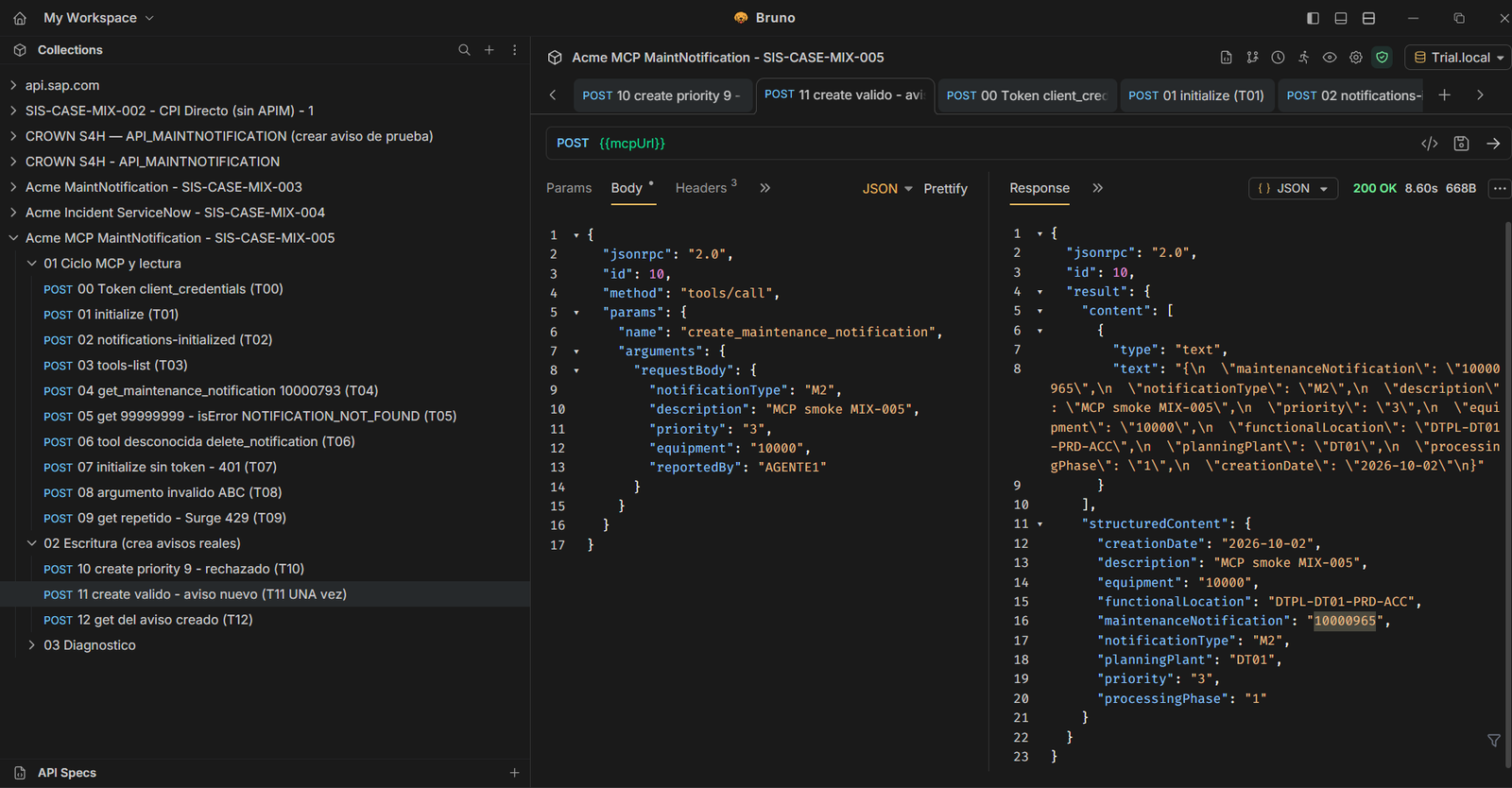 T11 created notification 10000965 and T12 queried it. The SAP check was recorded in IW23.
Each successful creation can generate a new notification. No idempotency key is documented: after an ambiguous timeout, review processing and SAP before repeating a write. The observed conversational confirmation does not replace technical write authorization.
Test with a real agent in Claude Desktop
A local stdio-to-Streamable-HTTP bridge connected Claude Desktop using the OAuth client credentials issued for this laboratory. The bridge obtains and renews the token and manages the MCP session. This was the route used in the test; a direct remote connection requires an OAuth flow appropriate for the client.
The agent read notification 10000965, requested missing fields and asked for confirmation before creating notification 10000967, with description CLAUDE CHAT. Verification in IW23 confirmed the new document. Creating a notification does not automatically create a maintenance order.
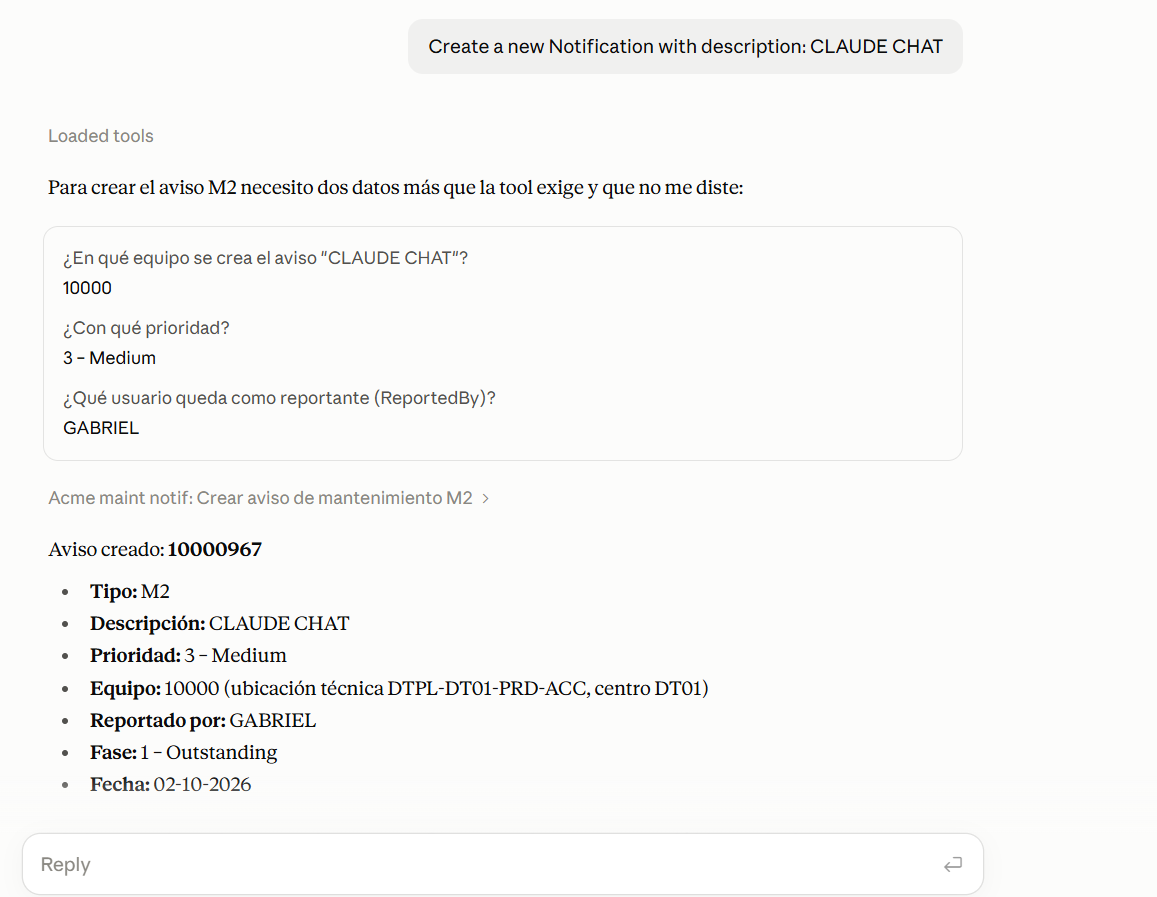 G1: evidence of the agent conversation and the creation call authorized by the laboratory user.
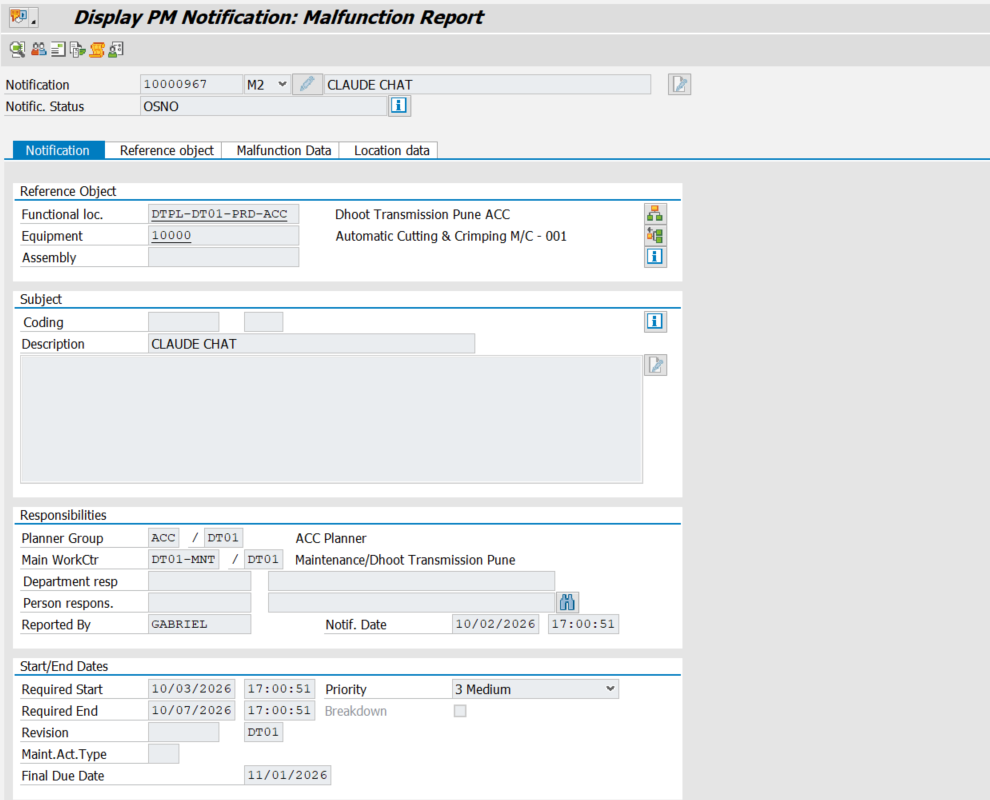 Verification of the document persisted in SAP. Public images conceal connection details and credentials.
What was verified and what remains
| Test | Recorded result |
|---|---|
| T00–T03: token, initialize, initialized and tools/list | 200, 200, 202 and discovery of two tools |
| T04: existing notification | Notification 10000793, order 1000 |
| T05: missing notification | HTTP 200 with isError=true, NOTIFICATION_NOT_FOUND and correlationId |
| T06: unknown tool | JSON-RPC error -32602 |
| T07: no Bearer | HTTP 401, noCredentials |
| T08: number ABC | Pattern rejection |
| T10: priority 9 | Enum rejection, no creation |
| T11–T12: create and read | Notification 10000965, checked in SAP |
| Direct MIX-003 regression | POST 201 created 10000966; GET 200 |
| G1: Claude Desktop | Read and creation of 10000967, verified in IW23 |
| T09: traffic limits | Configuration available; 429 evidence pending |
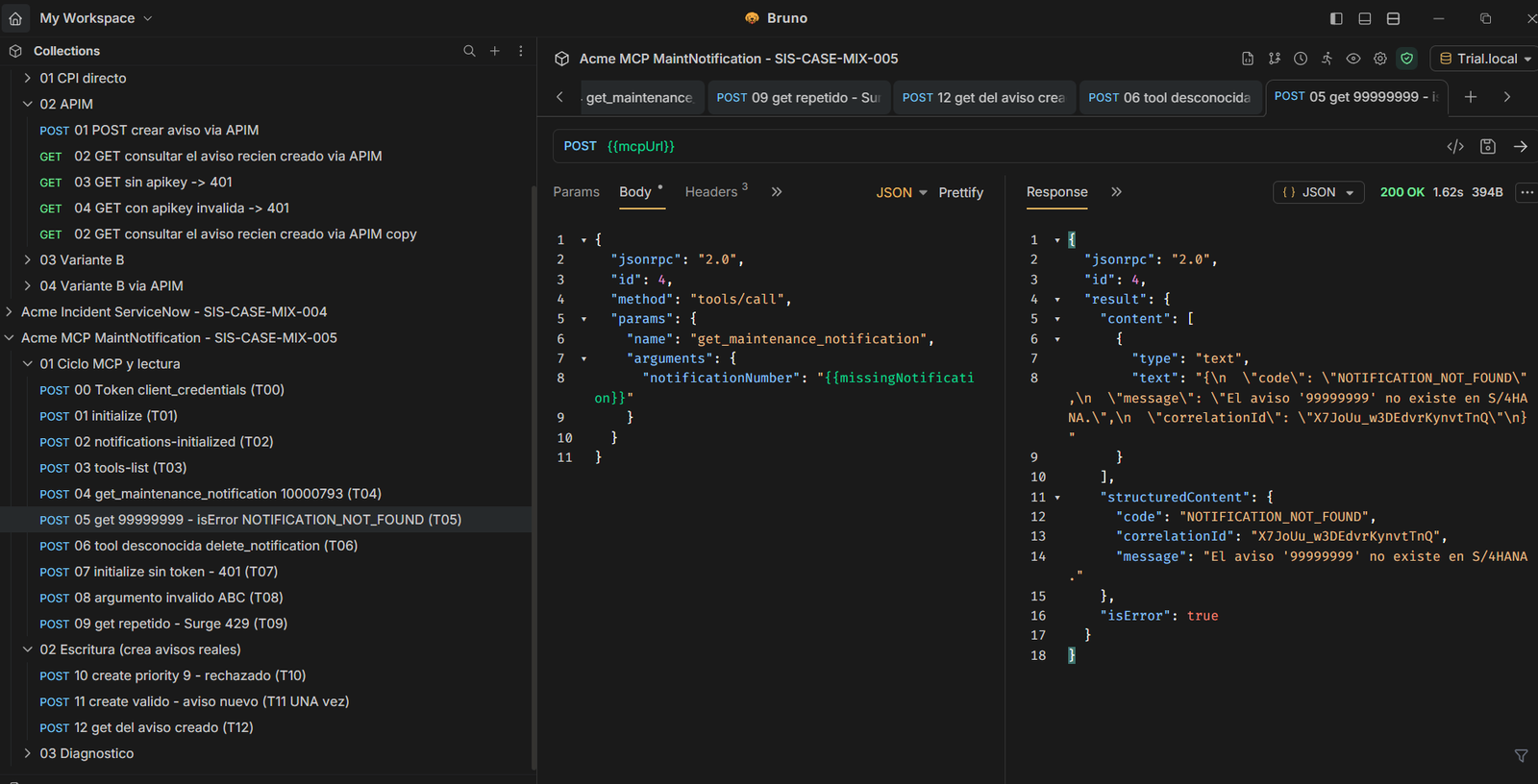 T05 illustrates why consumers must check isError and the error contract alongside HTTP status.
The next closure must complete T09, rotate agent credentials and the API key, review security and consolidate the case status. Production use also requires defined and tested write controls, scope by equipment or plant, identity auditing and duplicate handling. Traffic limits do not replace those controls.
Downloads and next steps
The public English manual contains 23 pages and 37 images, covering development, errors and tests. The technical package includes the T00–T12 Postman collection, an environment with placeholders, OpenAPI and four XML policies. Its README explains policy placement and which calls create documents.
Importing the files neither executes tests nor configures a tenant. Fill endpoints and secrets only in your local environment; execute T11 only with permission and reviewed inputs. The package contains no credentials, private destinations or the agent's local bridge.
This case extends the journey through the notifications API, validation and errors and integration alerts to ServiceNow. An agent can now use that API through a bounded MCP contract, with verified laboratory results and explicit remaining work.